Copy every bracket with care.
Then review every trade with evidence.
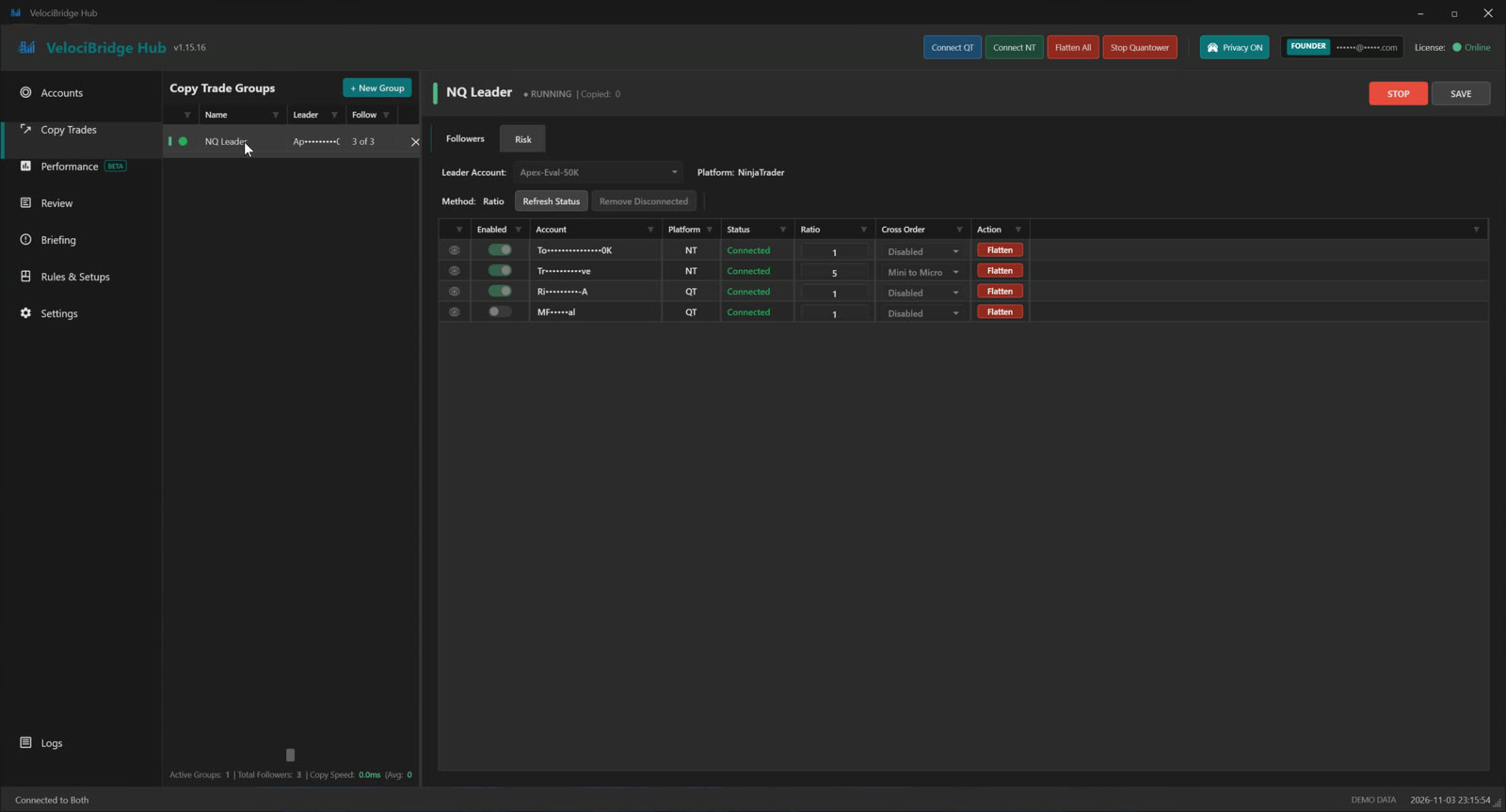
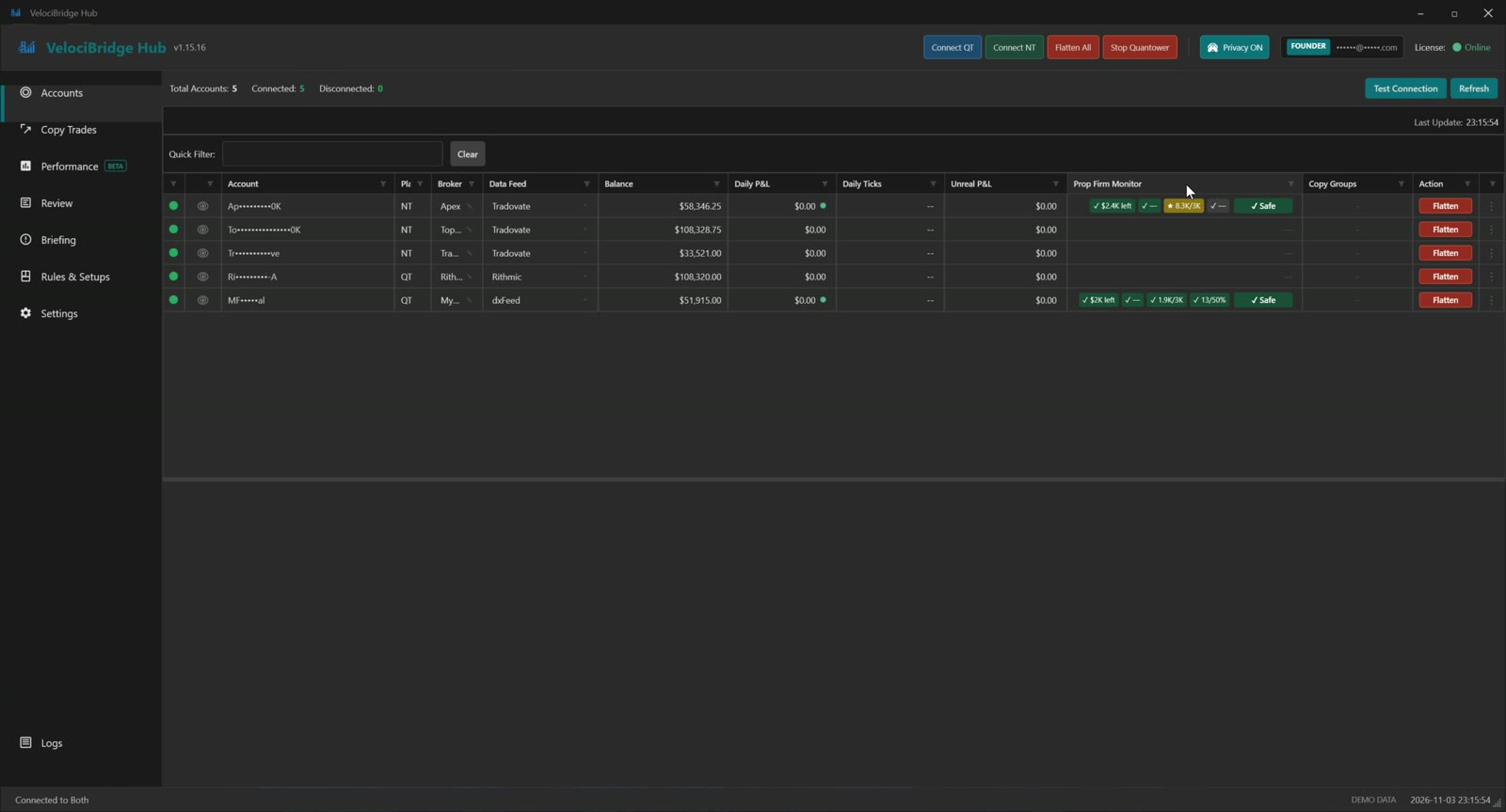
Two minutes: all accounts on one screen with prop-firm rules tracked live, NT↔QT copying with brackets intact, then the journal — screenshots on every trade, AI review against your rules, and the pre-session briefing.
Prefer YouTube? Open the overview on our channel.
The essentials traders care about — without the fluff.
Copies ATM behavior: breakeven moves, trailing stops, target edits, and manual adjustments.
Preserves 1–3+ profit targets and OCO links instead of flattening your structure.
Runs on your machine for fast, consistent replication — no cloud delay.
Uses your existing NT/QT platform connections. Nothing to configure.
Copy from one leader to multiple funded or evaluation accounts.
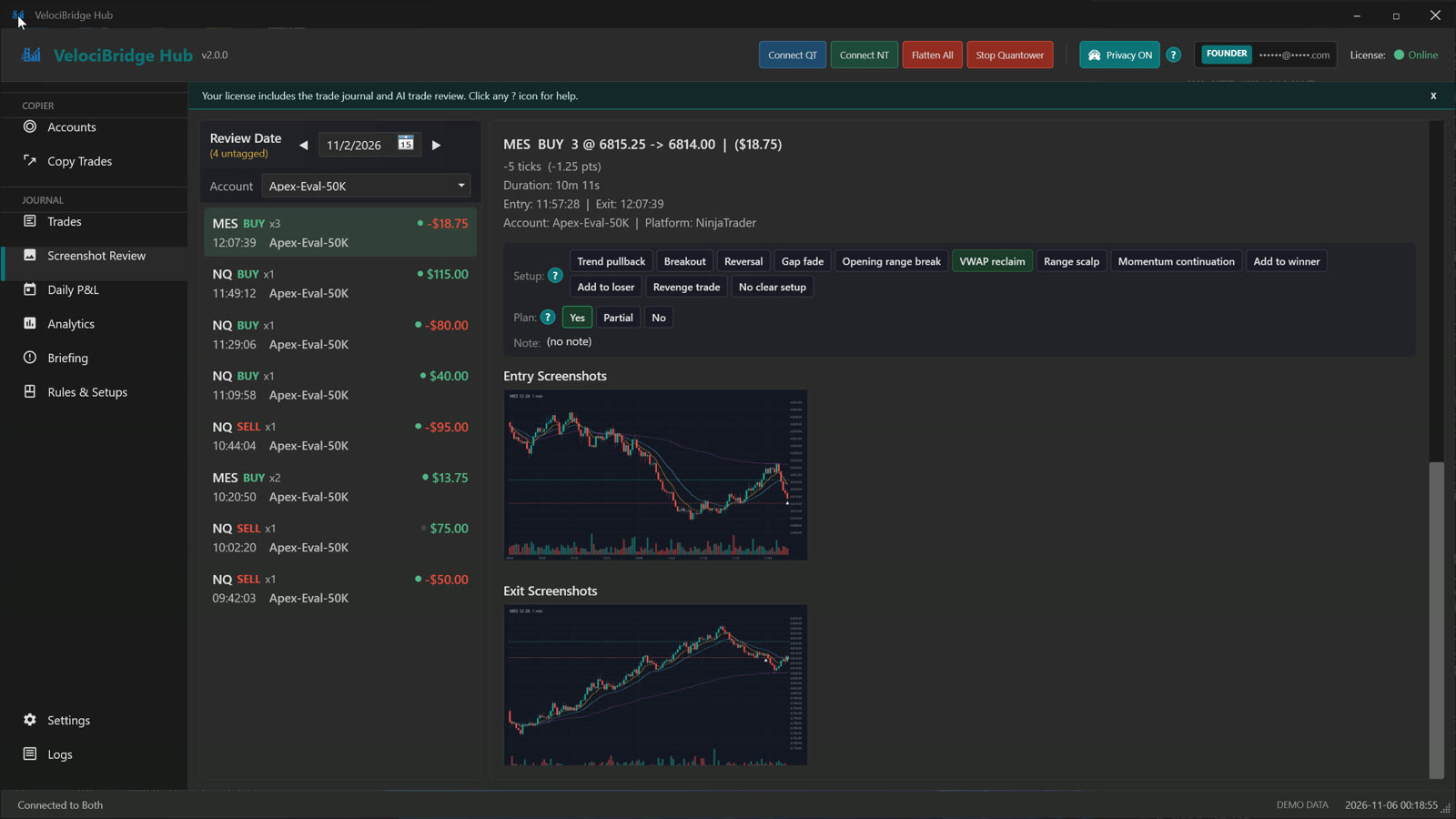
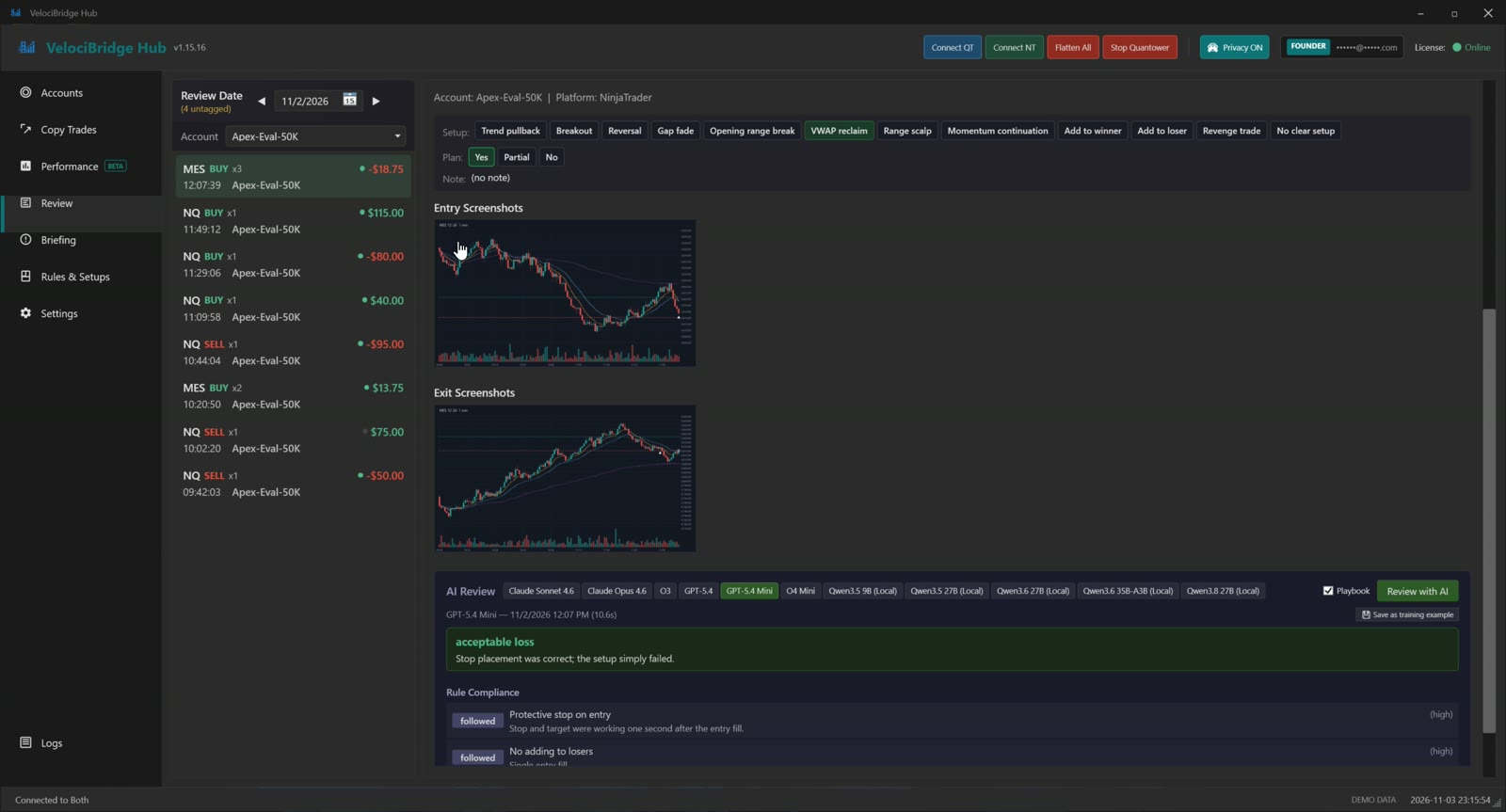
The Hub already watches every fill on every account. Now it keeps the evidence: a chart screenshot when the trade opens, another when it closes, the setup you tagged, and your own answer to did I follow the plan? Then an AI you choose grades the trade against your rules — not generic advice.
Pick the chart windows to capture. The Hub screenshots them at entry and at exit and files them with the trade, on your PC.
A small pop-up after entry asks which setup it was and whether you followed your plan: Yes, Partial, or No. Or tag later on the Review tab.
A verdict, rule-by-rule compliance with evidence, tag honesty, an entry grade, and one thing to do differently next trade. Optional warnings right after entry: revenge trade, loss limit, losing streak, adding to a loser.
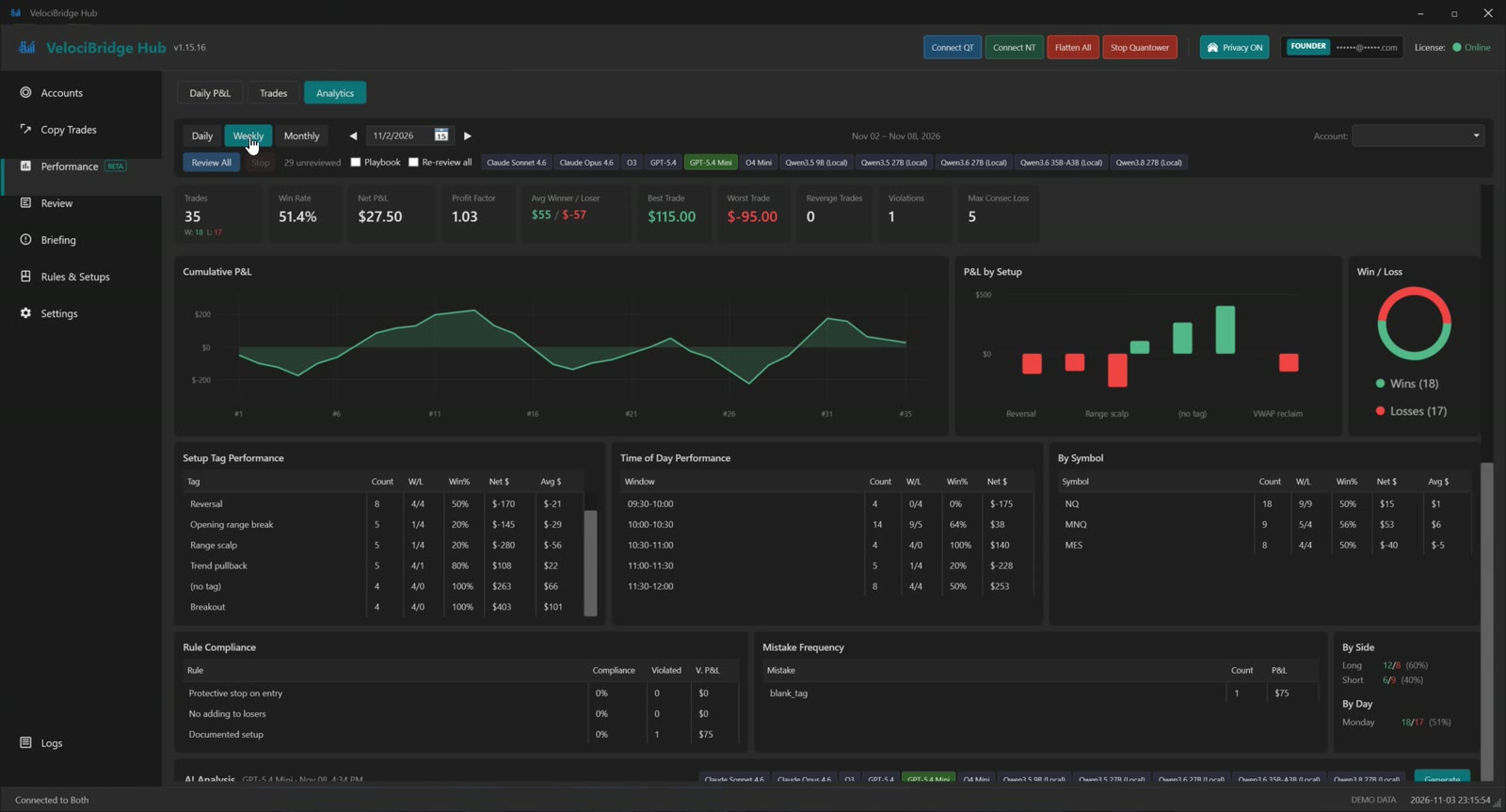
Win rate, profit factor, P&L by setup, by hour window, by symbol, rule compliance and mistake frequency. Daily, weekly, monthly. Review All in one click.
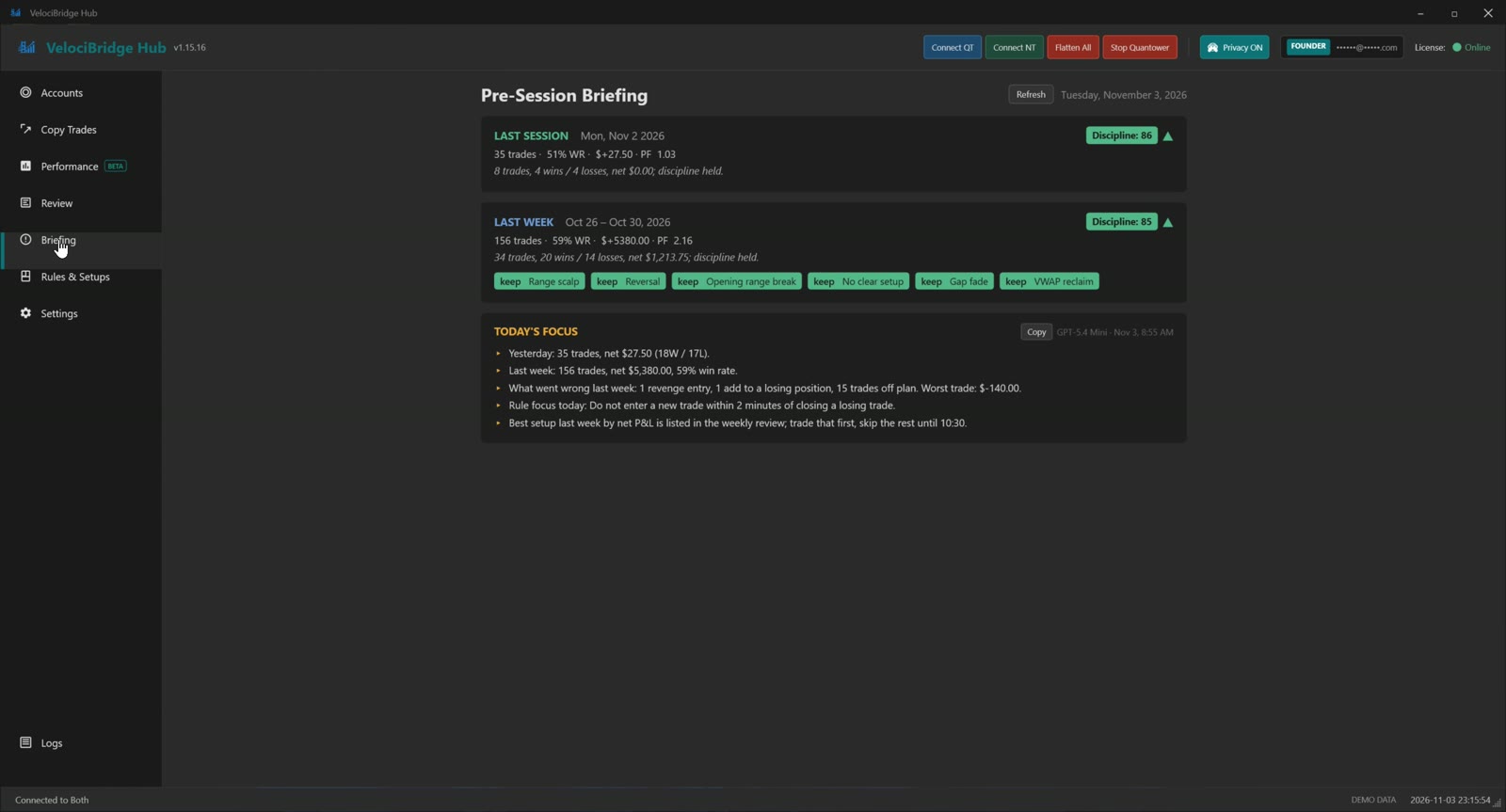
Last session and last week at a glance, a discipline score, and an AI-written focus for today: what went wrong, what to do about it.
Honest Limits
The journal is included in the $19 subscription. AI reviews run on your own Anthropic or OpenAI key (a few cents per review on the cheaper models) or on a free local model through llama-server. Keys are stored encrypted on your PC. Screenshots, keys and trades stay on your PC and are sent only to the provider you chose, only when you click Review; nothing reaches VelociBridge. The AI warns; it never blocks, changes or closes a trade. NinjaTrader and Quantower on Windows only.
A free NinjaTrader 8 indicator included with every VelociBridge subscription. When you're copy trading, one bad click on your leader account multiplies across every funded follower account — Discipline Guard blocks it at the Chart Trader button, before it ever becomes an order.
Seven rules, each a switch
Also: a fast-bar block after a velocity shock, the same rules on the chart's right-click order menu, a max stop distance that pulls a too-wide stop in, and Breakeven, TP +N and SL −N buttons on the card.
Discipline Guard lives inside Chart Trader and physically blocks every entry button — Buy/Sell Mkt, Buy Ask, Buy Bid, Sell Ask, Sell Bid, mouse or keyboard — the moment one of your own rules would be broken. The click never becomes an order. A status panel shows which rules are active, and if it can't hook the buttons it shows a red GUARD INACTIVE warning instead of pretending. There's deliberately no quick "off" switch on the chart — disabling a rule takes a conscious trip into the settings. Free with your subscription, NinjaTrader 8 only. It checks the license the Hub caches, so open the Hub at least once every 48 hours.
Honest Limits
Discipline Guard protects the Chart Trader entry buttons only. Orders placed through the DOM/SuperDOM, NinjaTrader hotkeys, ATM strategies, or the Rev button are not intercepted, and Close/Flat are never blocked — it never stands in the way of reducing risk. It's a guard rail, not an unbreakable lock. P&L tracking is gross (no commissions), counts the chart's instrument on the selected account, and resets when NinjaTrader restarts.
Copying, accounts, journal and review in one window. Demo data shown.
VelociBridge copies trades across any broker supported by NinjaTrader or Quantower including Rithmic, Tradovate, CQG (micro contracts), dxFeed, and ProjectX. If the account appears in NinjaTrader or Quantower, VelociBridge can copy trades to or from it.
VelociBridge connects to NinjaTrader and Quantower, and those platforms connect to your Rithmic, Tradovate, CQG (micro contracts), dxFeed, or ProjectX accounts. It copies trades based on what your platforms can see.
Copy trades between any combination of connections of Tradovate, Rithmic, ProjectX, CQG (micro contracts), dxFeed accounts.
Broker compatibility is determined by the platform, not by VelociBridge.
If you run multiple NT/QT accounts and care about execution details, VelociBridge is for you.
Create single or multiple trade copy groups, use the leader strategy and mirror it across multiple evaluation or funded accounts while preserving the exact brackets, stops, and partial exits you rely on. Ideal for traders scaling across prop firms via NinjaTrader or Quantower. This helps you keep risk consistent across all accounts with less manual work.
VelociBridge runs locally on your machine and issues orders through your NinjaTrader or Quantower platform. This local execution model avoids additional processing layers and helps keep trade copying responsive during fast intraday sessions, especially when managing multiple accounts.
Works with any NinjaTrader or Quantower connection
One subscription. Copier, journal, AI review and Discipline Guard.
14-day money-back guarantee on first payment. Cancel anytime.
Key details for futures traders using NinjaTrader & Quantower
Yes. VelociBridge is designed to mirror ATM-driven changes (breakeven moves, trailing stops, etc.) from your leader account to all followers, so their risk management follows what you do on the leader.
VelociBridge runs locally on your machine, connects to NinjaTrader and/or Quantower, and listens for executions and bracket updates on your leader account. It then issues corresponding orders and modifications on each follower account, keeping them in sync as closely as possible.
No. VelociBridge works through your existing NinjaTrader and Quantower platform connections. You log in to your brokers/prop firms the same way you already do in those platforms; VelociBridge does not require you to generate separate broker API keys.
Not necessarily. If all your accounts are on one platform (e.g., all Rithmic via Quantower, or all Tradovate via NinjaTrader), you only need that platform. You only need both when you're bridging mixed setups like Tradovate → Rithmic or NT → QT.
You can have multiple trade copy groups each with one leader and multiple follower accounts. Exact recommended limits will be refined based on more testing and feedback from early users.
You can run VelociBridge on your local trading machine. A VPS is optional if you prefer 24/7 uptime or want your setup closer to your broker's servers, but it's not required by the software.
VelociBridge places orders locally through your NinjaTrader or Quantower platform. Because execution happens on your machine, performance depends on your hardware, internet connection, broker routing, and overall market conditions. Internal tests show very low-latency behavior, but real-world results will vary from setup to setup.
Ratio-based and custom sizing per follower are on the roadmap, so you can scale positions according to account size while keeping the same structure and risk profile.
Yes, in two ways. First, the trade copier already works with TradingView indirectly — if you place a trade from TradingView into your leader account, VelociBridge copies it to all followers with full bracket preservation. Second, we are building direct TradingView webhook automation that converts your alerts into live orders on NinjaTrader or Quantower without needing a leader account at all. See the TradingView page for details.
Yes! VelociBridge supports trade copy between any combination of brokers. You can copy from a Rithmic leader to Tradovate followers, or vice versa. The system also works with CQG (micro contracts), dxFeed, ProjectX accounts, and any other connection supported by NinjaTrader or Quantower. This flexibility is perfect for traders managing both prop firm and personal accounts across different brokers.
Discipline Guard is a free NinjaTrader 8 indicator included with every VelociBridge subscription. It sits inside Chart Trader and blocks your entry-button clicks, mouse or keyboard, whenever one of your own rules would be broken, so a revenge trade on your leader account never becomes an order that copies to your funded followers. Seven rules: no averaging down, cooldown after a loss, daily loss limit, consecutive-loss stop, max trade size, no trading against the 15-minute candle, no trading against the trend. It guards the Chart Trader entry buttons only; DOM, hotkeys, ATM strategies and the Rev button are not intercepted, and Close/Flat are never blocked. NinjaTrader only.
The Hub screenshots the chart windows you choose when a trade opens and again when it closes, and files them with the trade. You tag the setup and say whether you followed your plan. When you click Review, the trade, its screenshots, your active rules and your setup definition go to the AI model you picked, which returns a verdict, rule-by-rule compliance with evidence, an entry grade and one thing to change next trade. Analytics roll this up by setup, time of day and symbol, and the Briefing tab summarizes last session and last week before you trade.
Not from us. The journal and review are part of the $19 subscription. AI reviews run on your own Anthropic or OpenAI account, which bills you per review (cents on the cheaper models), or on a local model through llama-server at no cost. You enter your key in the Hub; it is stored encrypted on your PC and never sent to VelociBridge.
Trades, screenshots, tags, rules and API keys stay in the VelociBridge data folder on your PC. The only time anything leaves is when you run a review: that trade's details and screenshots go directly to the AI provider you chose, and the reply is saved locally. Nothing is sent to VelociBridge servers except the license check.
CQG support currently covers micro contracts (MNQ, MES, etc.). All other listed connections are fully supported.
Performance Disclosure: VelociBridge is under active development. Any references to latency or execution behavior are based on internal testing under specific conditions.
Actual performance will depend on your hardware, network, broker connectivity, and configuration.
Features described may change as the product evolves. Trading futures involves substantial risk of loss and is not suitable for all investors.
Nothing on this site is trading or investment advice. See our Risk Disclosure for details.